What can the bot do for you?
Maps, world news and village information for every Discord server. Link your tribe database for reports, SOS alerts and shared analysis.
Commands for this section ↓Your world, right in Discord
Connect a world to get started with public game data, maps and The Herald. No tribe database or database membership required.
Start with /connect world:de261Your tribe data, in the right channel
Link your tribe database for SOS alerts, reports and analysis. These commands require the correct database connection and permissions.
Link your database in the Discord centre
Daily results without leaving the chat.
/daily shows today’s player results, bash points and village changes. Use /dailytribe for tribes. The Herald button posts the world report as an additional reply, keeping the daily message.
The Herald ↗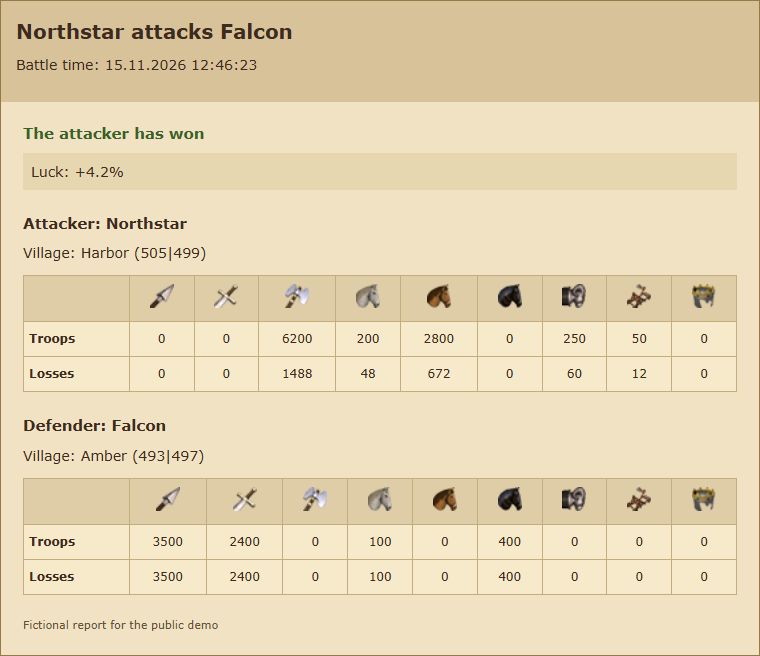
Read reports right in your channel.
/report turns a public report link into an image in the original design. No tribe database required. With report previews enabled, posting the link is enough: link-only messages are deleted after successful output; messages with extra text stay and receive a reply.
Open reports ↗Review catapult actions using your reports.
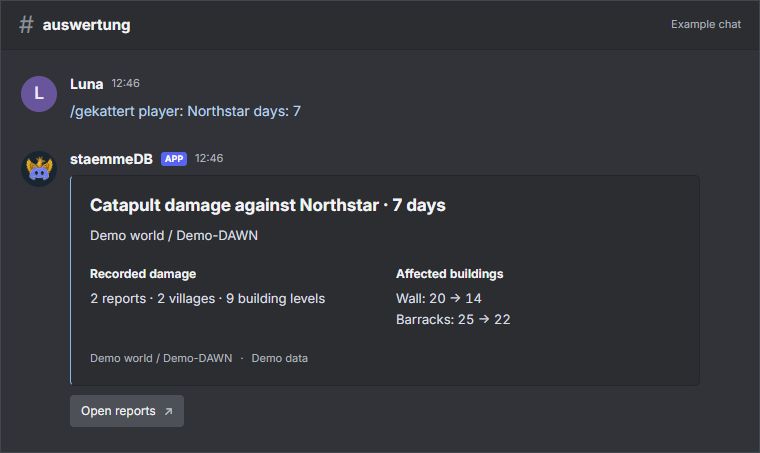
/gekattert shows damage against a player; /kata shows damage caused by them. Choose a player and period. The analysis uses saved reports from your connected database. The values here are a fictional output example.
Open reports ↗The whole world as a map in your channel.
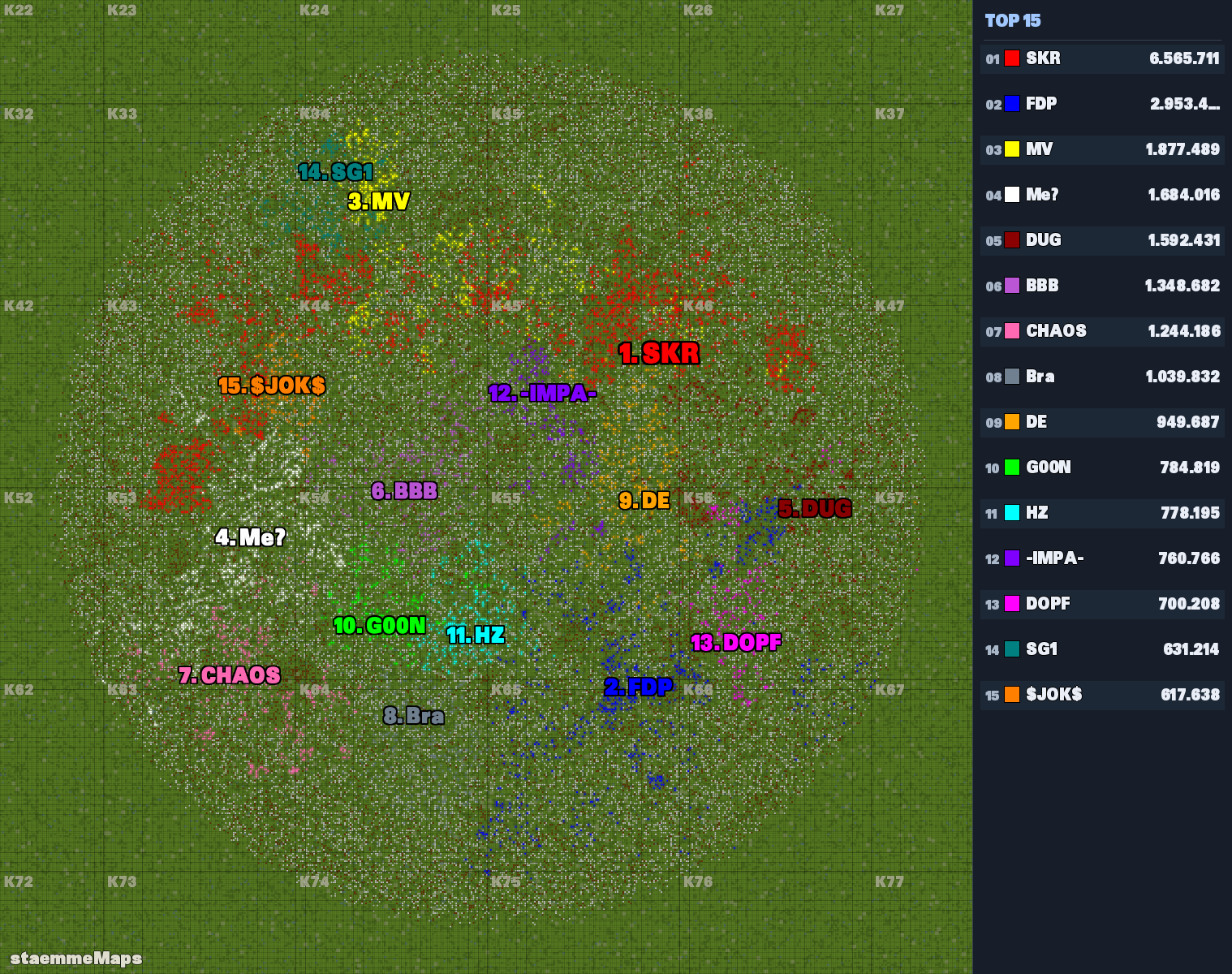
/staemme-maps offers twelve views, including top tribes, tribe dominance and top players. The bot posts the latest map with a legend as an image.
View the map in the demo ↗Three readable newspaper pages in one message.
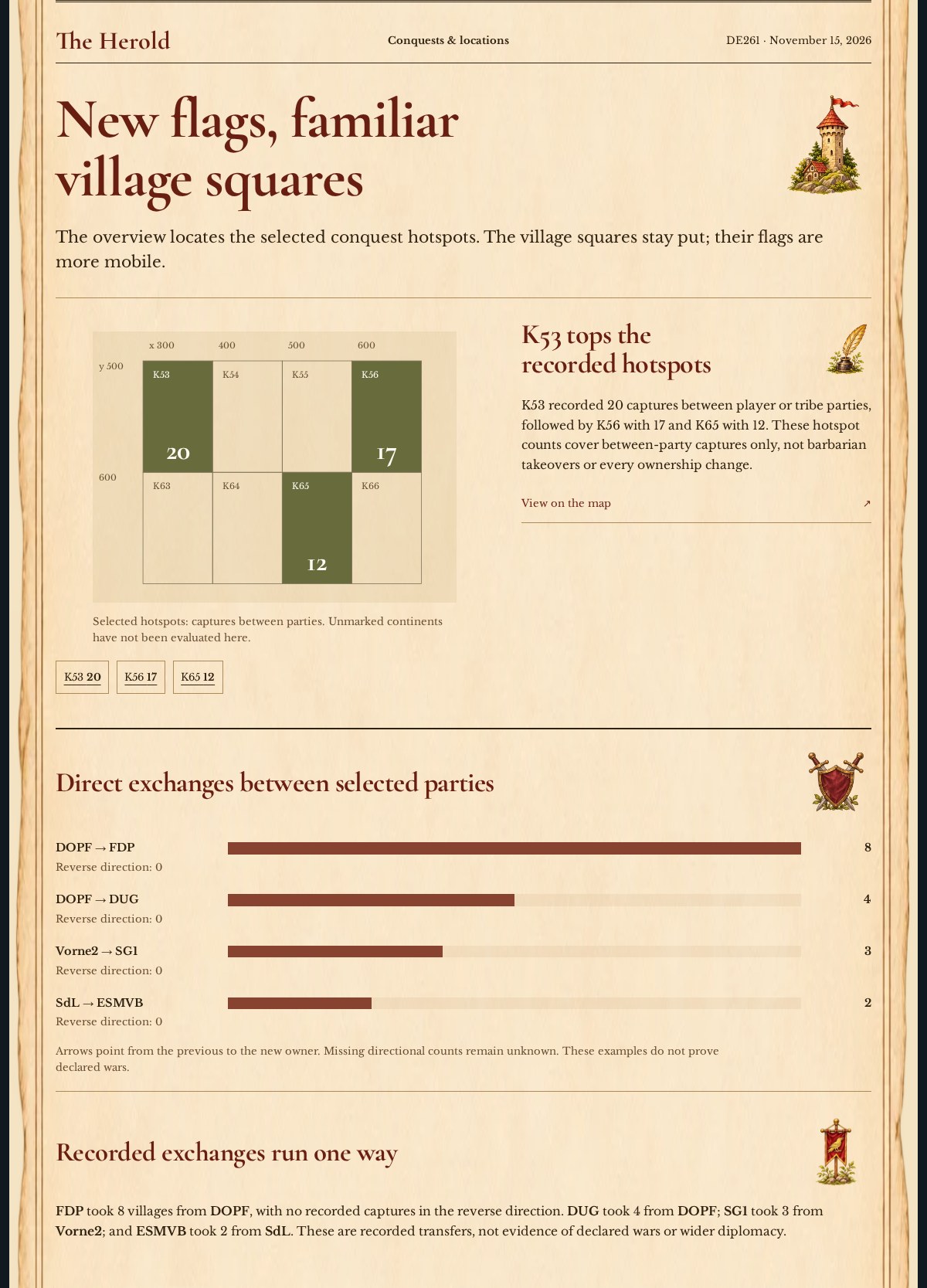
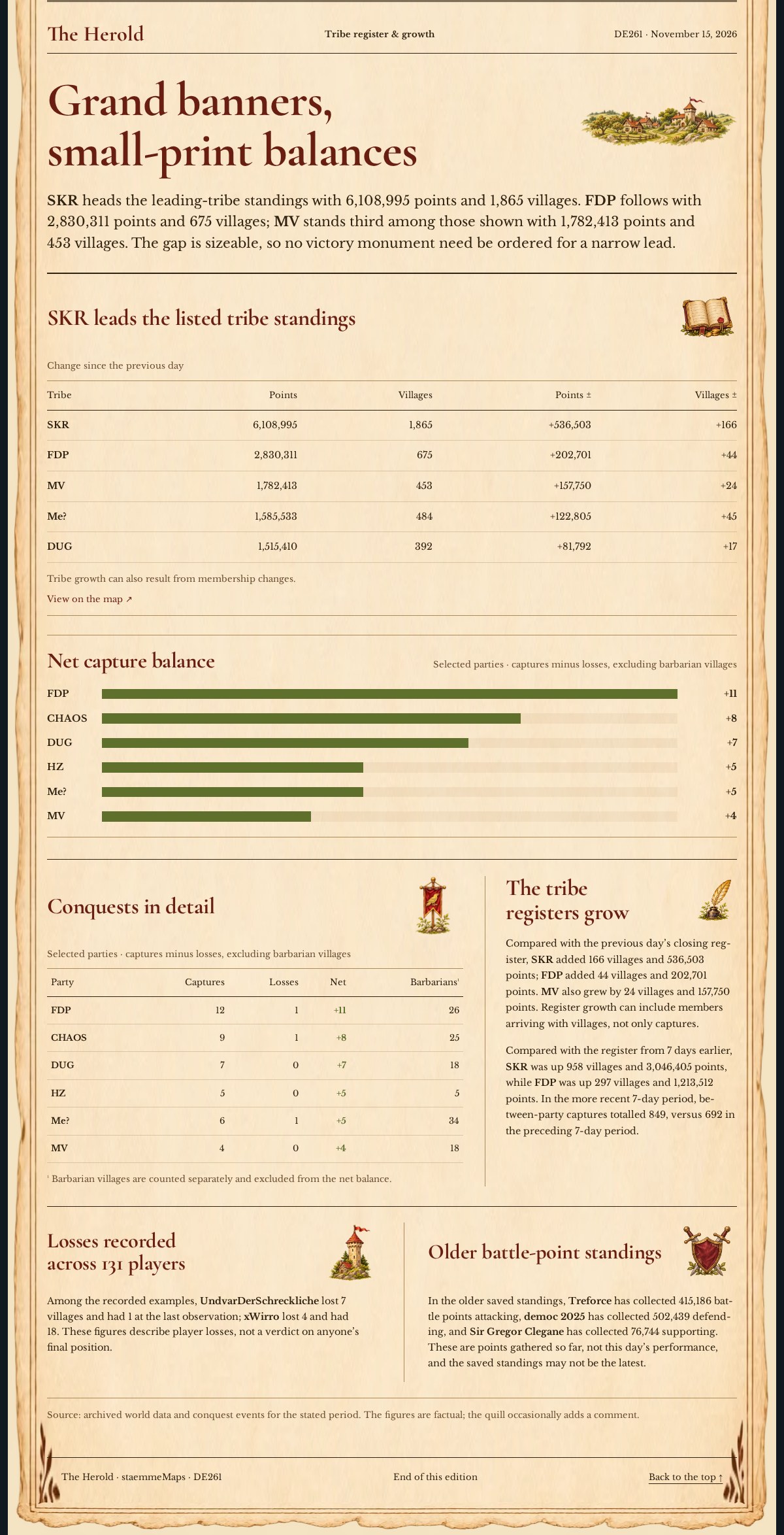
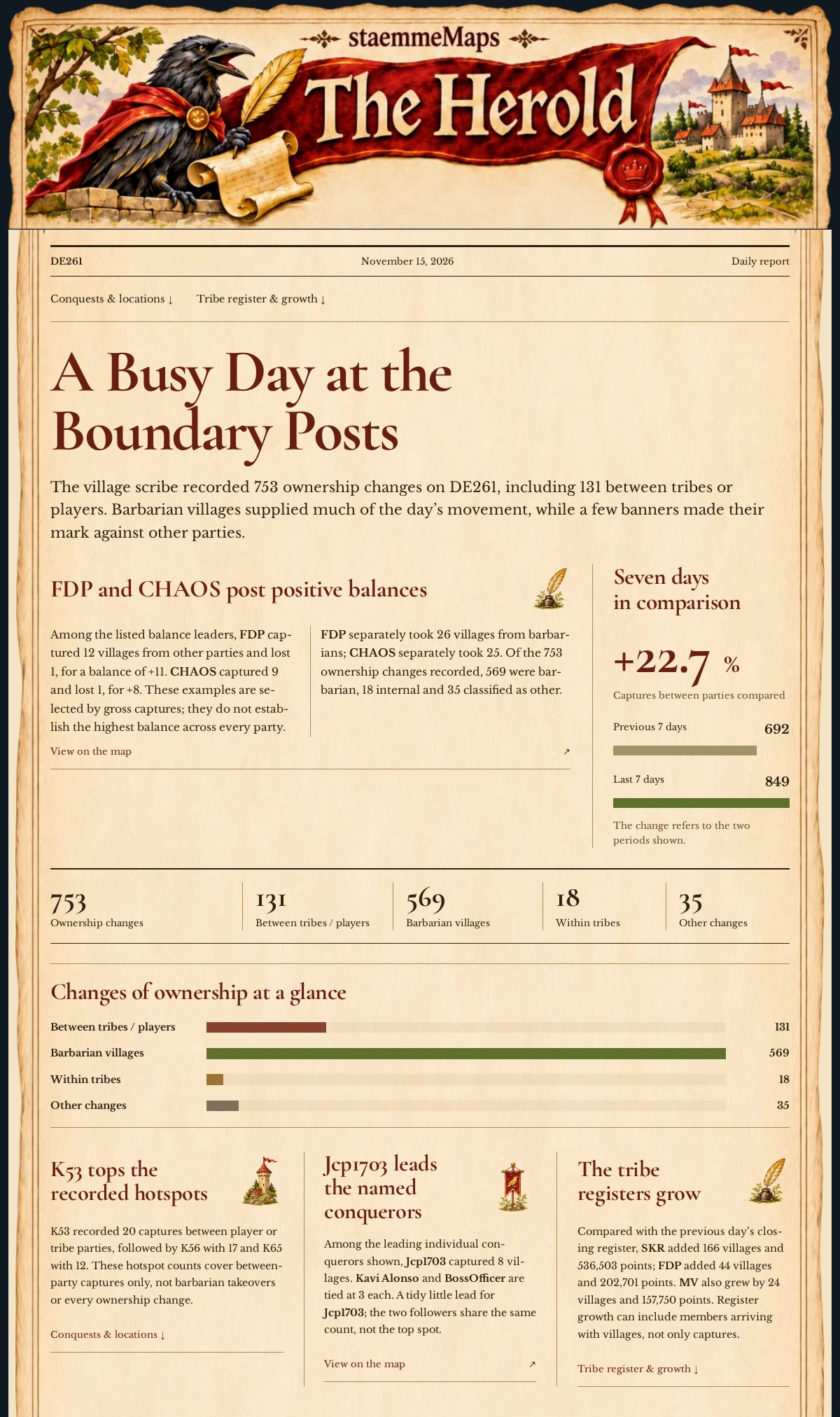
/herold shows the connected world’s daily report. Choose a date or the weekly edition if you prefer. All images appear together; /daily and /dailytribe also offer a Herald button.
View the map in the demo ↗Look up a village and hear about its next conquest.
/village shows the village name, owner and points. Set a one-time watch by DM or in the channel. It ends after the next conquest. With village previews enabled, the same options appear below coordinates posted in chat.
Open village ↗Your tribe sees new attacks right in the chat.
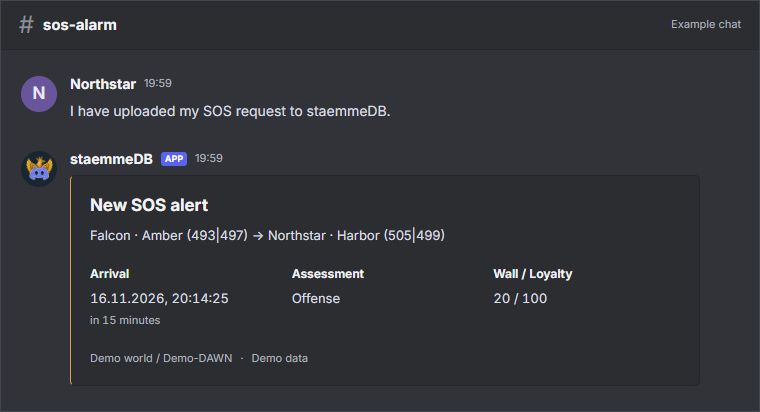
After an SOS upload, the bot can post an alert in your chosen channel. You can see the attacker, target, arrival time and assessment at a glance.
View attacks in the demo ↗Look up player information while coordinating.
Use /playerdb to get world information, village types, reports and current SOS attacks from your linked database. The buttons open the relevant pages in staemmeDB.
Open player ↗Keep track of the entire tribe.
Use /tribedb to see points, members, village types, reports and SOS attacks for a tribe. This example shows selected parts of the DAWN response.
Open tribe ↗Quickly see who needs help.
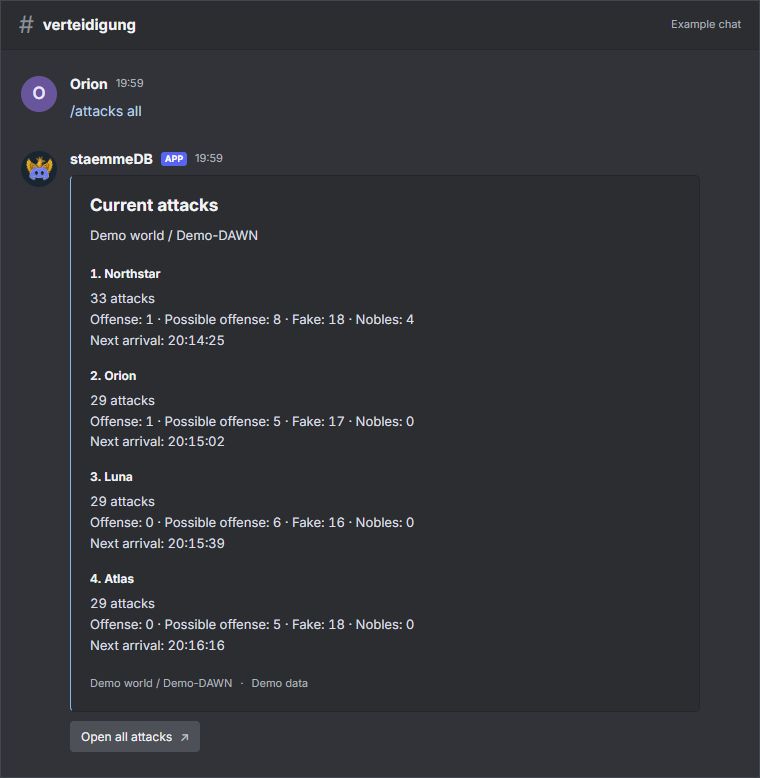
Use /attacks all to list attacked players by attack count. You can see the assessment and next arrival for each player.
Open all attacks ↗See together where the tribes are located.
Use /map to display selected tribes as an image right in the chat. DAWN is blue and DUSK is orange in this example. Click the image to view it at a larger size.
View the map in the demo ↗Find nearby villages right away.
Use /near to find villages, players or tribes around a coordinate. This example shows the five nearest villages within ten fields. Their coordinates are included for copying.
View the village filter in the demo ↗See the bot’s output
Open an image to view it at full size. Public snapshots and fictional demo data are labelled individually.
 Enlarge image
 Enlarge image
 Enlarge image
 Enlarge image
 Enlarge image
Commands for this section
This list follows your section choice. Search for a command or open its parameters and requirements.
Setup and account 0
/accountShows your StämmeDB link and world assignments.
/account
No additional options needed.
/connectLinks this channel to a world and can request database access.
/connect
worldRequiredWorld code such as de239, chp13 or dep1
databaseOptionalRequest database access immediately
/disconnectRemoves world and database links.
/disconnect
No additional options needed.
/helpOpens this help view.
/help
No additional options needed.
/previewsManage automatic village and report previews in this channel.
/previews
villagesOptionalAutomatically preview village coordinates
reportsOptionalAutomatically replace report links with images
/reportShow a public report link as an image in its original design.
/report
linkRequiredPublic report link from Tribal Wars / Die Stämme.
Players, tribes and villages 0
/heroldShows the channel world’s daily or weekly Herald.
/herold
editionOptionalDaily or weekly edition (default: daily)
Choices: Daily edition, Weekly editiondateOptionalSelect an archived edition or enter a date (YYYY-MM-DD)
/nearNearest players, tribes or villages around a coordinate.
/near
coordinateRequiredCenter such as 500|500
typeOptionalWhat should be searched?
Choices: Villages, Players, TribesradiusOptionalOptional radius in fields
Values from 1 to 200limitOptionalMaximum 20 entries
Values from 1 to 20
/overviewCompact world overview with top players, tribes, bash points and conquests between tribes.
/overview
No additional options needed.
/topTop 10 players or tribes.
/top
typeRequiredPlayer or tribe
Choices: Player, Tribe
/tribeTribe profile with points, members, villages and bash.
/tribe
tribeRequiredTribe tag, name or ID
/tribemembersTop members of a tribe.
/tribemembers
tribeRequiredTribe tag, name or ID
sortOptionalSorting for the member list
Choices: Rank, Points, Villages, Bash pointslimitOptionalNumber of members, maximum 25
Values from 5 to 25
/userPlayer profile with points, villages, bash and history.
/user
playerRequiredPlayer name or player ID
/villageShows a village by ID or coordinate.
/village
villageRequiredVillage ID or coordinate such as 500|500
/worldinfoWorld status, game speed, unit speed and features.
/worldinfo
No additional options needed.
History and statistics 0
/compareCompares two players or two tribes.
/compare
typeRequiredCompare players or tribes
Choices: Player, TribefirstRequiredFirst player name or tribe tag
secondRequiredSecond player name or tribe tag
daysOptionalPeriod in days
Values from 1 to 30
/historyPoint and village history of a player.
/history
playerRequiredPlayer name or player ID
daysOptionalPeriod in days, 2 to 30
Values from 2 to 30
/inactiveVillages with no point changes in the selected period. /inactive coordinates:500|500 radius:10
/inactive
daysRequiredPeriod in days
Values from 1 to 90min_pointsOptionalMinimum player points
tribeOptionalOptionally only players of this tribe
coordinatesOptionalVillage search center, e.g. 500|500
radiusOptionalSearch radius in fields (default: 10, maximum: 30)
Values from 1 to 30max_pointsOptionalMaximum points (with coordinates: village points)
publicOptionalPublish in the channel (default: only visible to you)
/statsPoint development of a player or global growth lists.
/stats
daysRequiredPeriod in days
Values from 1 to 90playerOptionalOptional player name
/statstribePoint development of a tribe or global tribe lists.
/statstribe
daysRequiredPeriod in days
Values from 1 to 30tribeOptionalOptional tribe tag or name
/tribehistoryPoint and village history of a tribe.
/tribehistory
tribeRequiredTribe tag, name or ID
daysOptionalPeriod in days, 2 to 30
Values from 2 to 30
Conquests and maps 0
/bashCurrent bash points of a tribe.
/bash
tribeRequiredTribe tag or name
typeRequiredWhich bash points should be shown?
Choices: All bash points, Attackers, Defenders, Supporters
/conquerLatest conquests, optionally for one player.
/conquer
playerOptionalOptional player name
/dailyToday's player values and village changes.
/daily
playerOptionalOptional player name
typeOptionalOptionally show only one category
Choices: All bash points, Attackers, Defenders, Supporters, Conquered villages, Lost villages
/dailytribeToday's tribe values and village changes.
/dailytribe
tribeOptionalOptional tribe tag or name
typeOptionalOptionally show only one category
Choices: All bash points, Attackers, Defenders, Village gains, Village losses, Conquests won, Conquests lost
/mapMap for tribes or top tribes.
/map
tribesOptionalTribe tags, separate groups with |
topOptionalNumber of top tribes
Values from 1 to 25templateOptionalYour saved template for this world
/mapgifCreates a historical map GIF.
/mapgif
fromRequiredStart date in DD.MM.YYYY format
toRequiredEnd date in DD.MM.YYYY format
top_playersOptionalMark top N players
Values from 1 to 20top_tribesOptionalMark top N tribes
Values from 1 to 20tribesOptionalTribe tags, separate groups with |
playersOptionalPlayer names, separate groups with |; separate names with spaces by comma
barbariansOptionalShow barbarian villages, default: enabled
namesOptionalShow names, default: enabled
percentOptionalShow percentages, default: enabled
templateOptionalYour saved template for this world
/staemme-mapsShows a fixed staemmeMaps map as an image.
/staemme-maps
typeRequiredWhich map would you like to display?
Choices: Top tribes, Tribe dominance, Top conquering tribes, Points per member, Top attacking tribes, Top defending tribes, Top players, Player dominance, Fastest conquerors, Top attackers, Top defenders, Top supporters
/templateManage personal world templates for maps and war overviews
/template save
Create or edit a template
templateOptionalYour saved template for this world
/template list
Show your templates for this world
No additional options needed.
/template delete
Delete one of your templates
templateOptionalYour saved template for this world
/tribeconquerLatest conquests of a tribe.
/tribeconquer
tribeRequiredTribe tag or name
/usermapMap for players or top players.
/usermap
playersOptionalPlayer names, separate groups with |; separate names with spaces by comma
topOptionalNumber of top players
Values from 1 to 25
/warMutual conquests between two sides, with map and balance
/war
templateOptionalYour saved template for this world
daysOptionalPeriod in fully completed world days
Choices: 7, 14, 30side_aOptionalTribe tags for the first side, separated by commas (no template required)
side_bOptionalTribe tags for the second side, separated by commas (no template required)
Following and notifications 1
/followlistShows your active follows.
/followlist
No additional options needed.
/notifyManages SOS and report notifications in the channel.
/notify set
Enables notifications for this channel.
typeRequiredWhich data should be posted?
Choices: SOS, ReportsmodeOptionalSingle messages or summary
Choices: Single messages, SummaryroleOptionalOptional role to ping for new messages
playerOptionalOptional player filter. SOS: defender, reports: attacker or defender
tribeOptionalOptional tribe filter. SOS: target tribe, reports: involved tribe
filterOptionalOptional content filter
Choices: All messages, SOS: offensive attacks only, SOS: possible offensive attacks only, SOS: only nobles, Reports: only nobles, Reports: only catapults, Reports: only wall damage, Reports: only watchtower, Reports: only clean off
/notify unset
Disables notifications for this channel.
typeOptionalWhich data should be posted?
Choices: SOS, ReportsplayerOptionalOptional player filter. SOS: defender, reports: attacker or defender
tribeOptionalOptional tribe filter. SOS: target tribe, reports: involved tribe
filterOptionalOptional content filter
Choices: All messages, SOS: offensive attacks only, SOS: possible offensive attacks only, SOS: only nobles, Reports: only nobles, Reports: only catapults, Reports: only wall damage, Reports: only watchtower, Reports: only clean off
/notify status
Shows active notifications for this channel.
No additional options needed.
/setEnables automatic channel features.
/set
typeRequiredWhich automatic feature should be managed?
Choices: Player dailies, Tribe dailies, ConqueststribeOptionalOptional tribe tag or name for tribe dailies or tribe conquests
/setfollowPersonal direct messages · no database membership required
/setfollow
typeRequiredWhat should be watched?
Choices: Player, Tribe, Village, AreatargetOptionalPlayer name, tribe tag or name, village coordinates such as 500|500
x1OptionalArea: first X coordinate
Values from 0 to 999y1OptionalArea: first Y coordinate
Values from 0 to 999x2OptionalArea: second X coordinate
Values from 0 to 999y2OptionalArea: second Y coordinate
Values from 0 to 999only_lossOptionalOnly notify when the target loses a village
involved_tribeOptionalOptionally only notify when this tribe is involved
/unfollowRemoves one or more follows.
/unfollow
idOptionalFollow ID from /followlist
typeOptionalWhat should be watched?
Choices: Player, Tribe, Village, AreatargetOptionalPlayer name, tribe tag or name, village coordinates such as 500|500
/unsetRemoves automatic channel features.
/unset
typeRequiredWhich automatic feature should be managed?
Choices: Player dailies, Tribe dailies, ConqueststribeOptionalOptional tribe tag or name for tribe dailies or tribe conquests
Your database 10
/attacksOngoing attacks from the linked database.
/attacks player
Shows attacks on a player.
playerRequiredPlayer name or player ID
/attacks tribe
Shows attacks on a tribe.
tribeRequiredTribe tag, name or ID
/attacks coordinate
Shows attacks on a coordinate.
coordinateRequiredCoordinate such as 500|500
/attacks all
Shows the currently most attacked players.
No additional options needed.
/dailyattacksAttack lists.
/dailyattacks
listOptionalOptionally show a specific attack list
/defenseCompact defense overview.
/defense
tribeOptionalOptionally only affected members of this tribe
/gekattertCatapult damage against a player.
/gekattert
playerRequiredPlayer name or player ID
daysOptionalPeriod in days, default: 1
Values from 1 to 30
/kataCatapult damage by a player.
/kata
playerRequiredPlayer name or player ID
daysOptionalPeriod in days, default: 1
Values from 1 to 30
/playerdbPlayer profile with reports, SOS and database data.
/playerdb
playerRequiredPlayer name or player ID
daysOptionalPeriod in days, maximum 30
Values from 1 to 30
/reportstatsReport statistics with time limit.
/reportstats
daysRequiredPeriod in days, maximum 30
Values from 1 to 30playerOptionalOptional player filter
tribeOptionalOptional tribe filter
/targetAnalyzes a target village: SOS, reports, owner and database view.
/target
targetRequiredVillage ID or coordinate such as 500|500
daysOptionalPeriod in days, maximum 30
Values from 1 to 30
/timelineTimeline for player or village, target is detected automatically.
/timeline
targetRequiredPlayer name, player ID, village ID or coordinate
typeOptionalOptional: target type, otherwise automatic detection
Choices: Automatic, Player, VillagedaysOptionalPeriod in days, maximum 30
Values from 1 to 30per_pageOptionalEntries per page (1–3, default: 3). Use the page buttons for further results.
Values from 1 to 3
/tribedbTribe profile with reports, SOS and top targets.
/tribedb
tribeRequiredTribe tag, name or ID
daysOptionalPeriod in days, maximum 30
Values from 1 to 30
No commands in this section match your search. Clear the search or choose another topic.
This list comes from the bot’s actual command registrations. Availability depends on your linked world, database and Discord permissions.